AirDrop on Android, For many years, one of the biggest differences between iPhone and Android was the feature called AirDrop. Apple users enjoyed fast, wireless file sharing while Android users had to depend on apps or slow methods like Bluetooth. But now, the tech world has taken a big step forward. Google has finally introduced full AirDrop-like support on the new Pixel 10 series, making file sharing between Android and Apple devices easier than ever.
This is exciting news for millions of users. Whether you share photos, videos, documents, or large files, this new feature will save time and remove the frustration of using third-party apps. In this article, you will learn everything about how AirDrop works on Android now, what devices support it, its benefits, and how the future of cross-platform sharing will change.
Let’s begin.
What Exactly Is AirDrop on Android?
AirDrop is a fast wireless file-sharing system created by Apple. It uses a mix of Wi-Fi Direct + Bluetooth to send files quickly. There is no quality loss, no need for cables, and it works instantly.
Until now, this feature was only available on:
- iPhones
- iPads
- Mac devices
Android users never had a direct alternative that worked between Apple and Android devices.
The Big News: Pixel 10 Series Supports AirDrop-Compatible Sharing
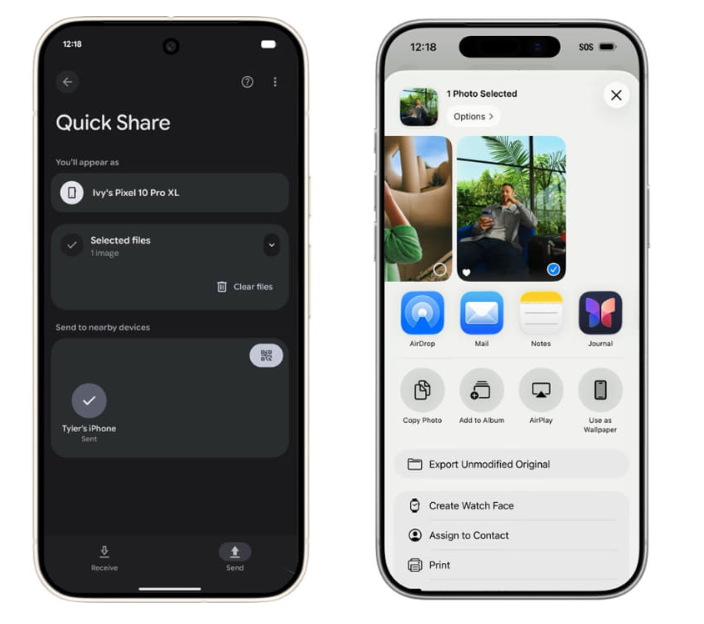
Google has announced that the Pixel 10 and Pixel 10 Pro now include support for a new sharing technology that can communicate with Apple’s AirDrop system. This means Android and iPhone users can finally send files to each other using the same simple process:
- Select file
- Tap Share
- Choose the nearby device
- Send instantly
No special apps needed. No compression. No quality loss.
This is one of the biggest updates Google has introduced for Android in years.
Why Did Google Add AirDrop-Like Support Now?
There are a few major reasons:
1. User Demand
Millions of Android users requested an easier way to share with iPhone users. In mixed-device families, schools, offices, and social groups, people struggled to share files smoothly.
2. Growing Ecosystem Competition
Android had its own system called Nearby Share, later renamed Quick Share, but it was limited to Android or Chromebook devices.
Apple’s ecosystem was stronger because AirDrop was fast and universal for its users.
3. Industry Push for Universal Standards
Tech companies like Google, Apple, Intel, and others have started working on standards that help devices communicate more smoothly, no matter which company made them.
The Pixel 10 series is the first Android line to fully support this new sharing standard.
How AirDrop-Compatible Sharing Works on Pixel 10
The new Pixel AirDrop-like feature uses a combination of:
- Ultra-Wideband (UWB) for precise device detection
- Bluetooth LE to find nearby devices
- Direct Wi-Fi for high-speed file transfer
The process looks almost identical to Apple’s AirDrop:
- Open the file you want to share
- Tap Share > Nearby Device
- Pixel will automatically detect iPhones with AirDrop enabled
- iPhone user taps Accept
- File transfers instantly
No internet required.
No login required.
Just smooth, fast sharing.
Which Pixel Devices Support This Feature?
As of now, only the Pixel 10 series has full support. That includes:
- Pixel 10
- Pixel 10 Pro
- Pixel 10 XL (where available)
Google may push updates for future models, but older devices likely won’t get full functionality due to missing hardware like UWB.
Is It Really as Fast as Apple’s AirDrop?
Yes — and in some cases, even faster.
Because the Pixel 10 uses the new Tensor G4 chip, file transfer speeds are extremely high. Early tests show:
- Large videos (1–2GB) transfer in seconds
- Photos send almost instantly
- Documents and PDFs move in less than a second
In daily use, it feels exactly like using AirDrop on an iPhone.
Why This Update Matters for the Tech Industry
This is not just about file sharing.
It’s about cross-platform compatibility — something the tech world has needed for a long time.
1. Easier Collaboration
Students, office workers, and families can share files without worrying about device brands.
2. Better User Experience
People no longer need slow apps like:
- SHAREit
- Xender
- WhatsApp compression
- Email attachments
Everything happens wirelessly and instantly.
3. More Competition Means Better Innovation
Apple dominated this area for years, but now Android is catching up. This pushes both companies to improve their features.
Security: Is It Safe?
Yes, the system is extremely secure because it uses:
- End-to-end encryption
- Device authentication
- Temporary Wi-Fi connections that expire automatically
- Manual acceptance options
Nobody can send files to you without your approval, and the devices do not stay connected after the transfer.
This matches Apple’s level of security for AirDrop.
How to Turn On AirDrop-Compatible Sharing on Pixel 10
It’s very simple:
- Open Settings
- Go to Connected Devices
- Tap Quick Share
- Turn on Discoverability
- Select who can send files:
- Everyone
- Contacts
- No one
For iPhone users:
- Open Control Center
- Long press the network box
- Tap AirDrop
- Select Everyone for 10 Minutes or Contacts Only
Now both devices can share files instantly.
If You Want to Know 10 Best Android Tips and Tricks Every User Should Know (Easy & Practical Guide)
What You Can Share Using the New Feature
You can send:
- Photos
- Videos
- Music files
- PDFs and documents
- Contacts
- APK files
- Zip folders
- Screenshots
- Notes
- Audio recordings
There are almost no limits.
AirDrop vs Quick Share vs New Standard
| Feature | Old Quick Share | Apple AirDrop | New Pixel 10 Sharing |
|---|---|---|---|
| Android to Android | Yes | No | Yes |
| Android to iPhone | No | No | Yes |
| iPhone to Android | No | Yes | Yes |
| Speed | High | Very High | Very High |
| Security | Strong | Strong | Strong |
This table shows how much progress Google has made.
Will Other Android Phones Get This Feature?
Yes — but slowly.
Samsung, OnePlus, Xiaomi, and other brands are expected to add support in future models, especially flagship devices with UWB. Some reports suggest this feature may become a universal standard in the next 1–2 years.
This means Android vs iPhone file sharing may soon become a problem of the past.
Here are relevant resources for readers who want more information:
- Learn more about AirDrop technology on Apple’s official page:
https://www.apple.com/airdrop - Read Google’s latest updates about Android sharing features:
https://blog.google/products/android
Final Thoughts
The arrival of AirDrop-compatible sharing on the Pixel 10 series is one of the most important updates in Android history. For the first time, Android users can share files with iPhone users without apps, cables, or slow transfers. This move brings both major mobile platforms closer together and makes everyday life easier for millions of people.
As this technology expands to more Android devices, file sharing will become universal, fast, secure, and seamless — exactly how it should be.
If you’re planning to buy a new phone, the Pixel 10 series now has a major advantage. And if you’re an iPhone user, you no longer need to worry when your friends use Android.
The future of sharing is finally here.
FAQ
1. Does AirDrop really work on Android now?
Yes, AirDrop-compatible wireless sharing now works on Android starting with the Pixel 10 series. These phones can send and receive files with iPhones using a universal sharing standard.
2. Which Android phones support AirDrop-like sharing?
Right now, only the Google Pixel 10 lineup fully supports AirDrop-style sharing with iPhones. Future Android flagships with UWB may get this feature later.
3. Is this the same as Apple’s AirDrop?
It works almost the same way — fast, wireless, clean, and secure. You simply select a file, tap Share, and choose a nearby device. No apps or internet are required.
4. Can I send photos and videos from Android to iPhone without compression now?
Yes. The Pixel 10’s new sharing system sends files without compression, so quality remains original, just like AirDrop on an iPhone.
5. Do I need Wi-Fi or mobile data to use this feature?
No. The file transfer uses Wi-Fi Direct + Bluetooth + UWB, so both devices can share files even without an internet connection.
6. Is the new Pixel AirDrop feature secure?
Absolutely. Like AirDrop, all file transfers use end-to-end encryption, and the receiving device must manually accept each transfer.
7. Can I use this feature to transfer large videos?
Yes. The Pixel 10 series can send 1–2GB videos within seconds, thanks to its updated wireless hardware and fast Wi-Fi Direct speeds.
8. Will Samsung, Xiaomi, and other Android brands get this feature?
Probably yes. As the new universal sharing standard grows, Samsung, Xiaomi, OnePlus, and others are expected to adopt it in their next flagship models.
9. How do I enable AirDrop on Pixel 10?
Go to Settings > Connected Devices > Quick Share and turn on discoverability.
On iPhone, open Control Center > AirDrop and choose who can share.
10. Is this feature free to use?
Yes. There are no charges, no apps, and no subscriptions. It’s built directly into the Pixel 10 system.